Flexible Fees Manager for WooCommerce
Increase your WooCommerce revenue with smart, conditional extra fees
Unlock new revenue streams with smart fee automation.
Create unlimited fees
Add fixed or percentage-based fees for any condition — products, categories, shipping methods, cart totals, and more. Build as many fee rules as your store needs.
Smart conditional logic
Apply fees automatically when your defined rules match. Use product type, quantity, user role, location, subtotal, shipping zone, or any other built-in condition.
Transparent Fee Display
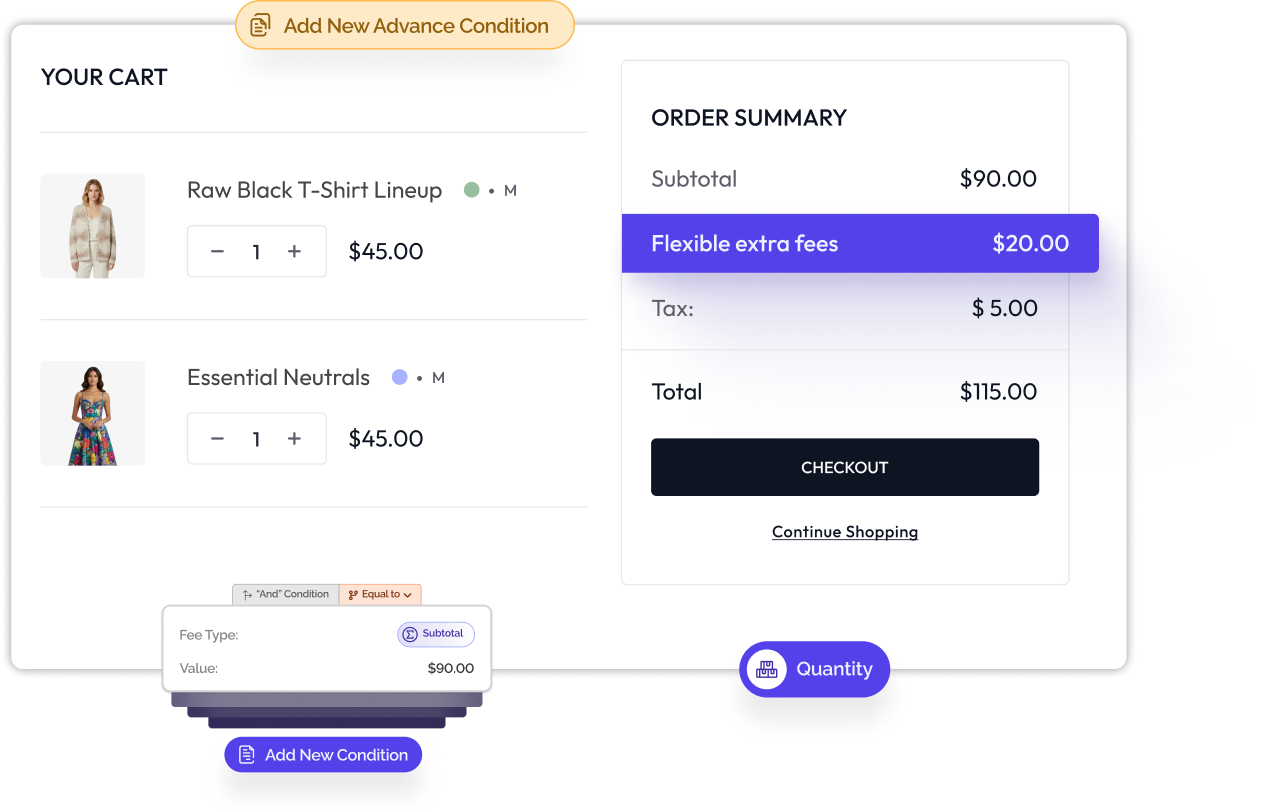
Fees are shown clearly on cart and checkout pages, helping customers understand exactly why they were added — improving trust and reducing confusion.
Simple interface, powerful control
Designed for beginners and advanced users alike. Create and manage complex fee structures without needing technical knowledge or coding.
Unlimited Rule Combinations
Stack multiple conditions together to create precise pricing logic. Build simple or advanced fee structures tailored to your business model.
100% WooCommerce-Compatible
Works seamlessly with major themes, page builders, multi-step checkout plugins, and all popular payment gateways for a smooth, conflict-free experience.
Set your rules
Apply conditions
Automate your store
Create your fee, define the logic, choose how it appears to customers, and let automation handle the rest. No coding, no complexity — just complete control over your WooCommerce fee rules.
Set Your Fee Rules
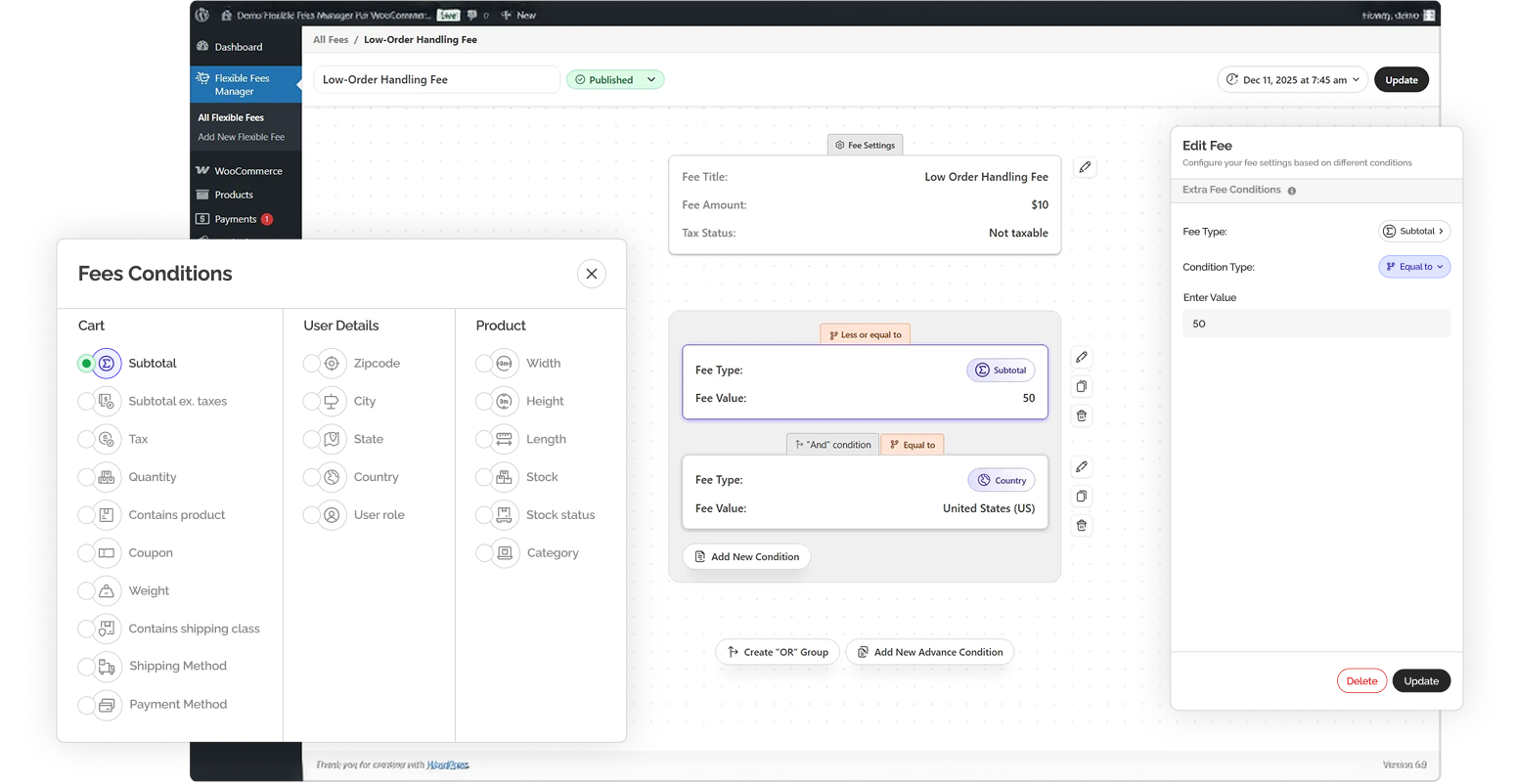
Start by defining the type of fee you want to apply. Flexible Fees Manager for WooCommerce allows you to create fixed or percentage-based fees that work at cart level, product level, shipping level, or location based. FFMW adapts to any scenario.
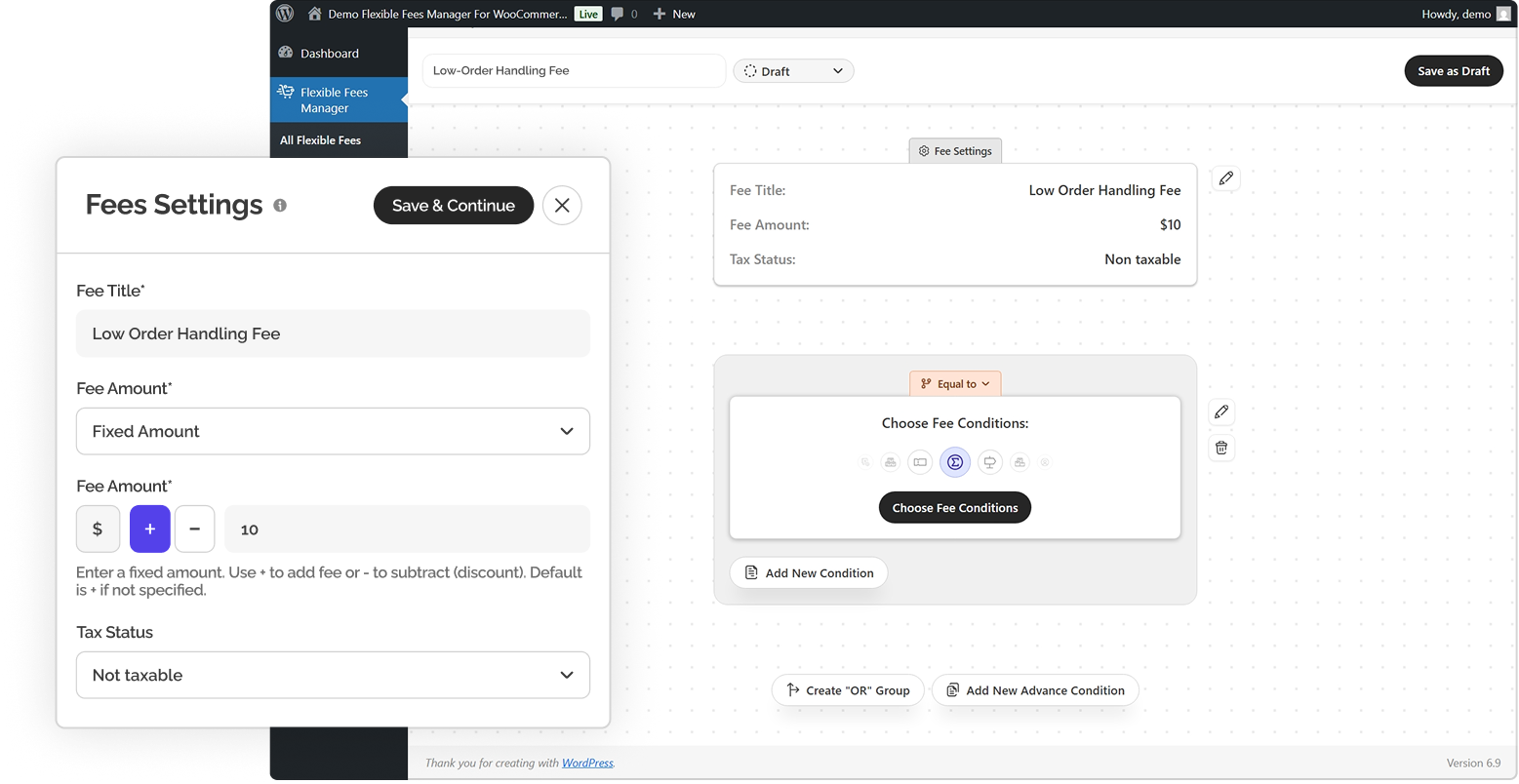
Choose Fee Conditions
Define exactly when and how a fee should apply using the built-in condition builder. The intuitive interface lets you create rules based on cart values, users, products, and locations — all through dropdowns and selectors.
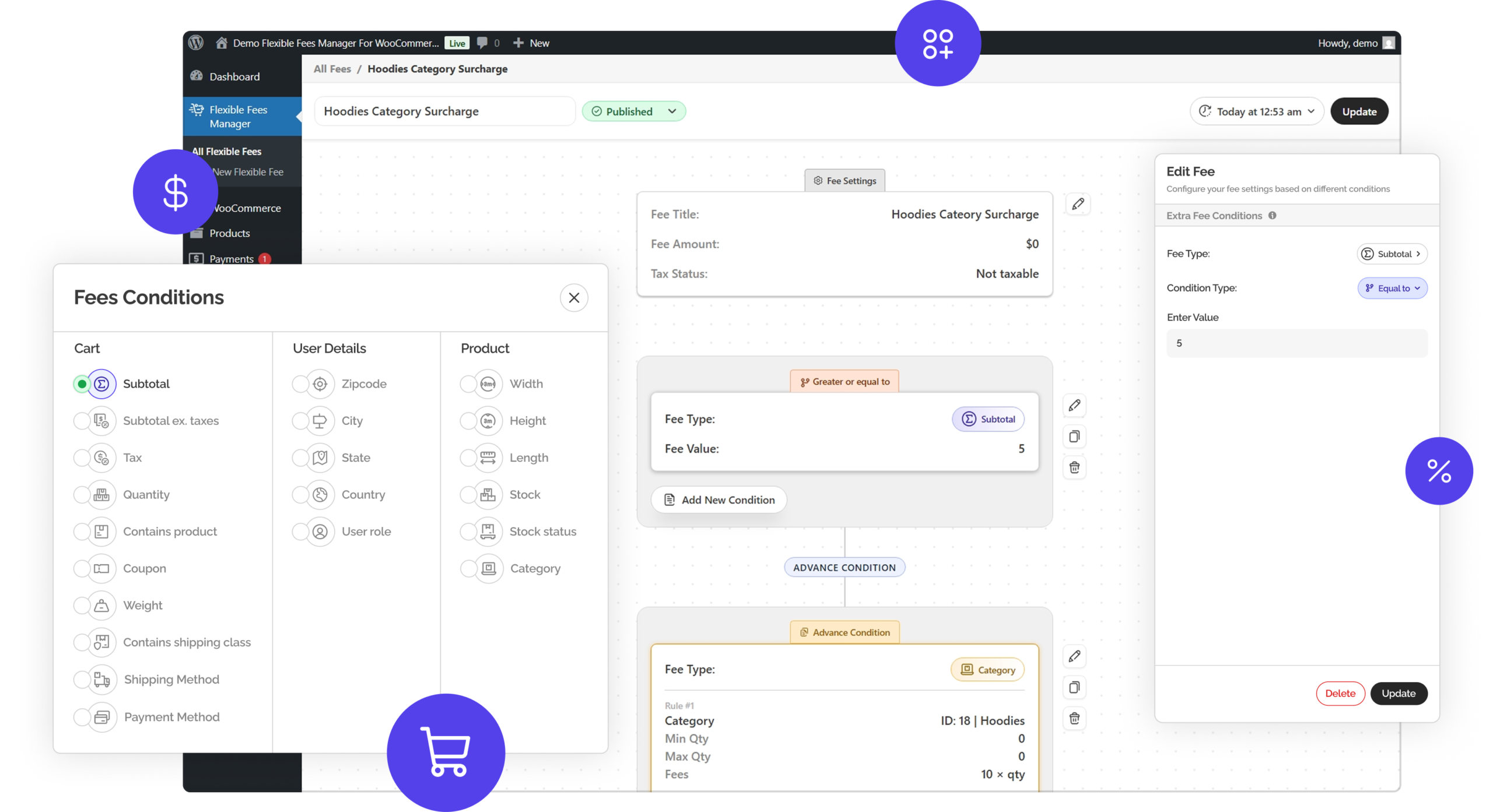
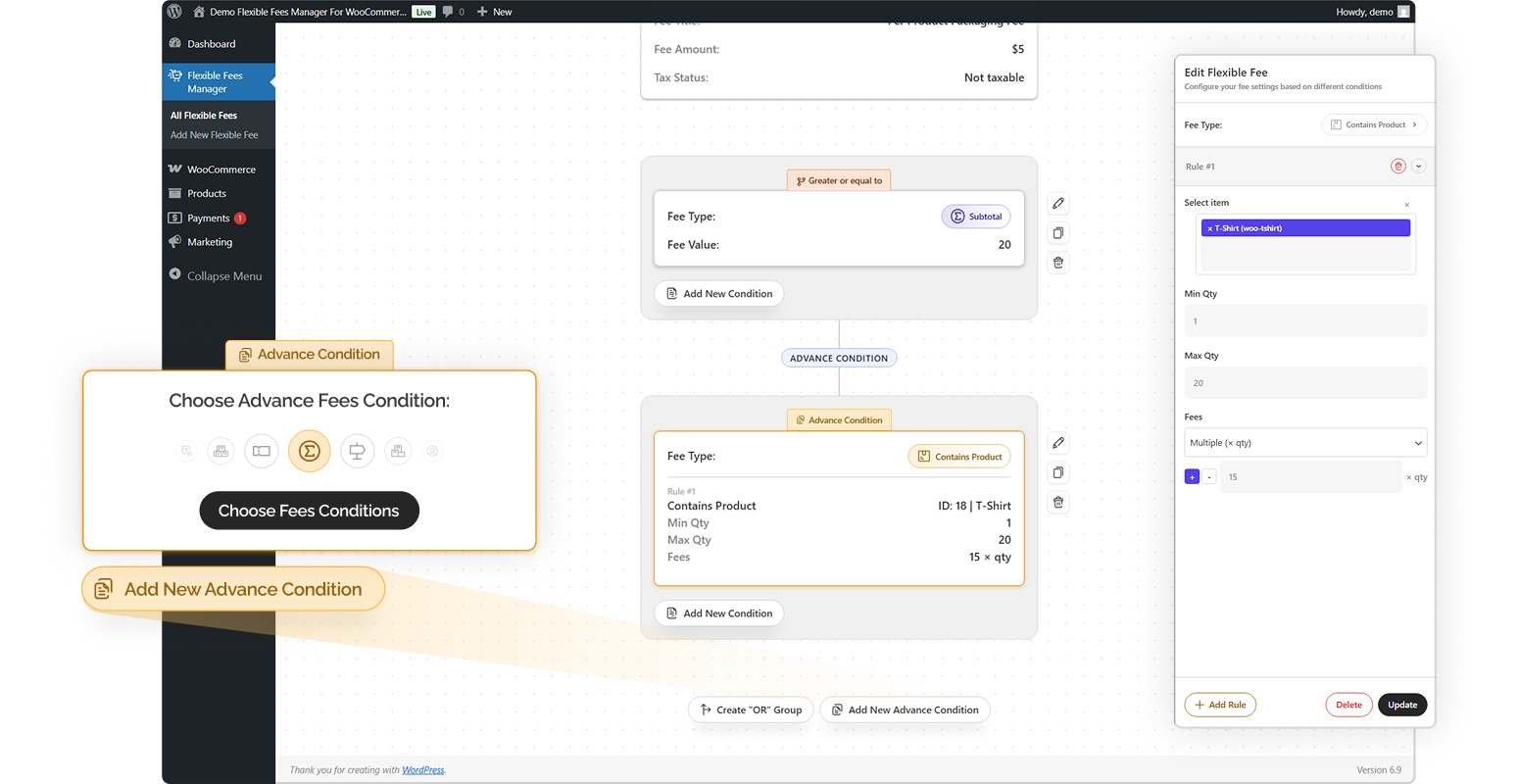
Add Advanced Conditions
Take full control with advanced condition logic. Combine multiple rules using AND / OR logic to create highly specific fee behavior tailored to your store’s needs.
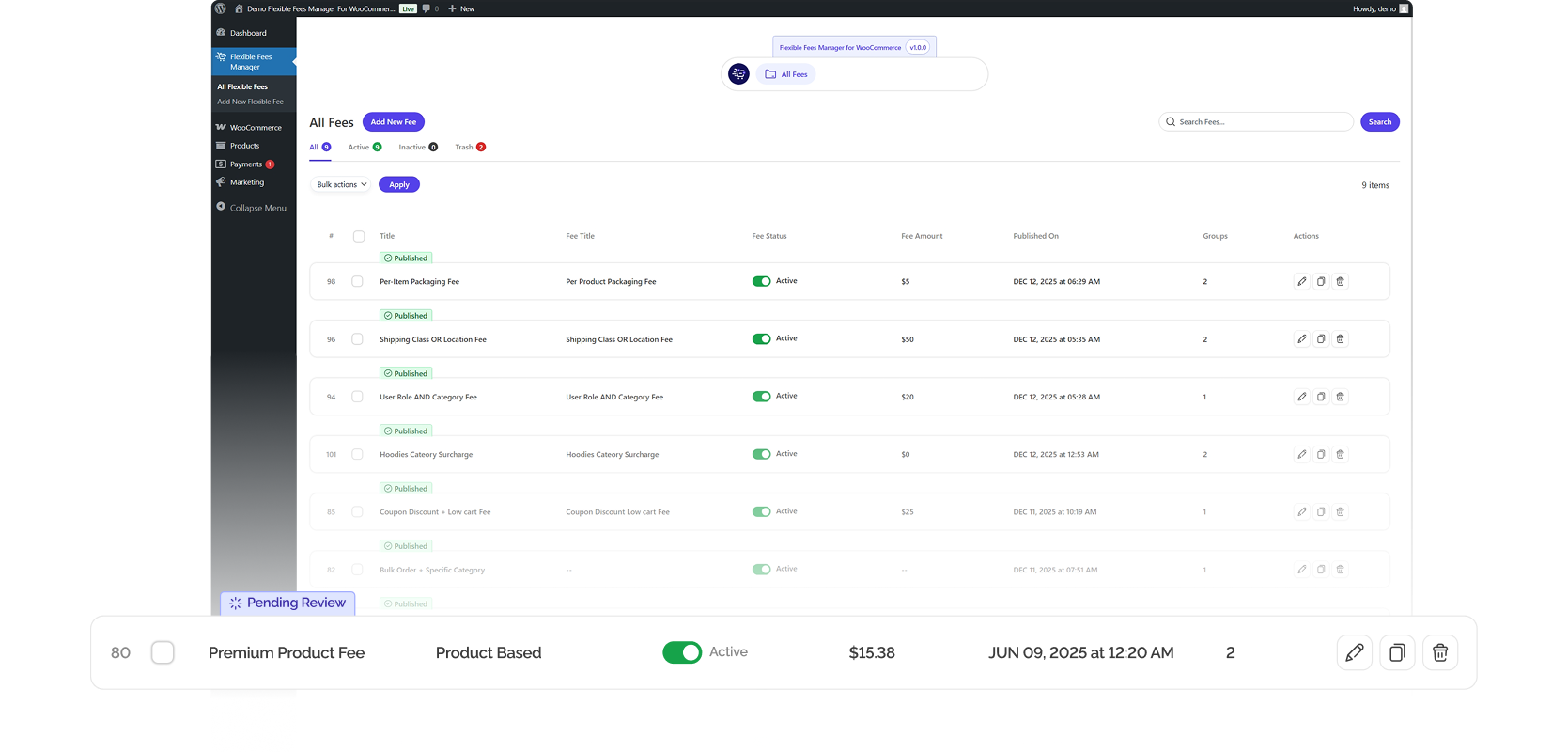
All Fees Dashboard
Manage all your WooCommerce fees from one centralized dashboard. View, enable, disable, or edit fee rules without digging into individual settings.
Watch it work instantly
Once saved, your fee rules apply automatically in real time. Customers see fees instantly on the cart and checkout pages as conditions are met — with clear labels and transparent pricing.
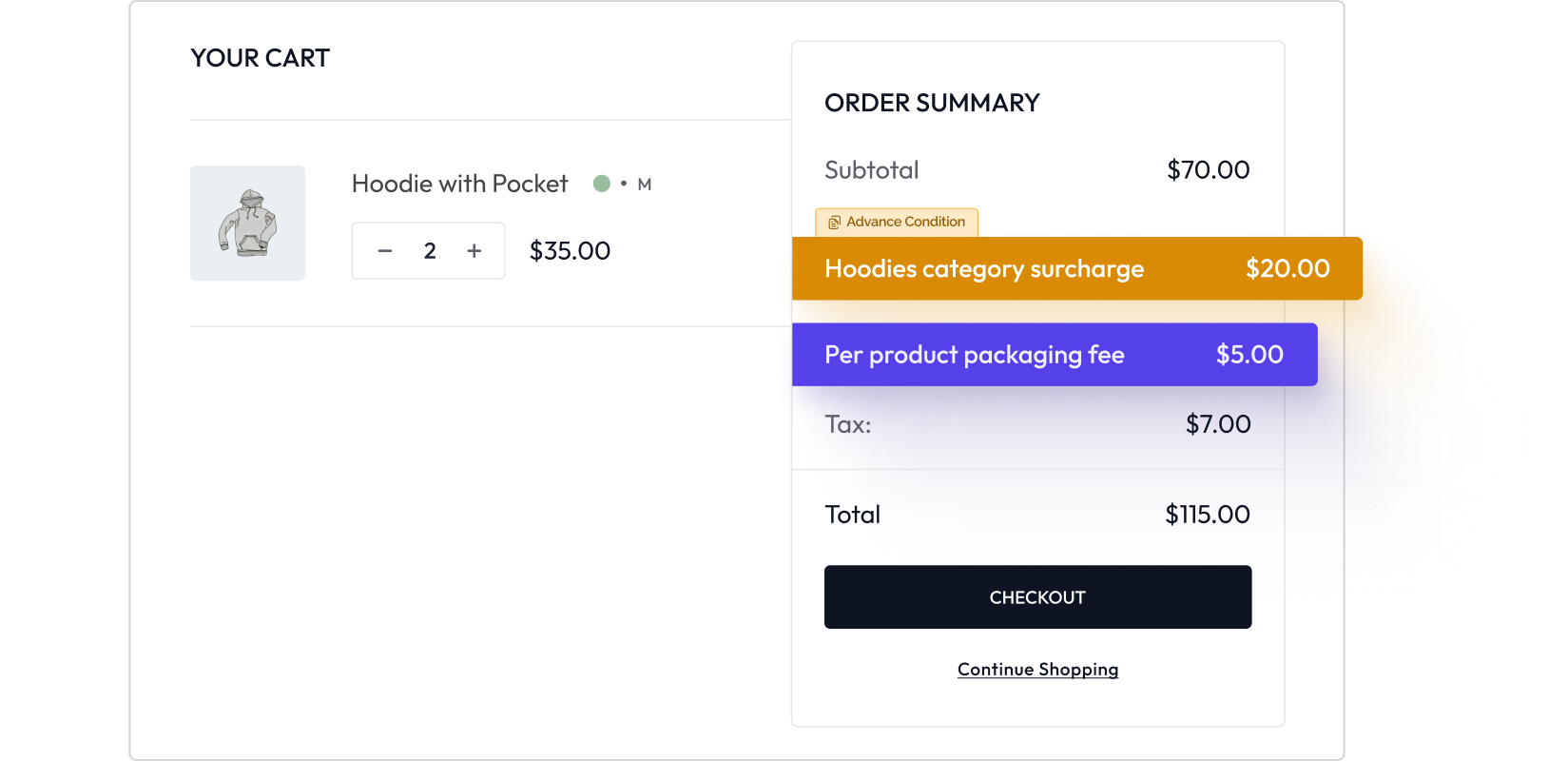
Fees Conditions
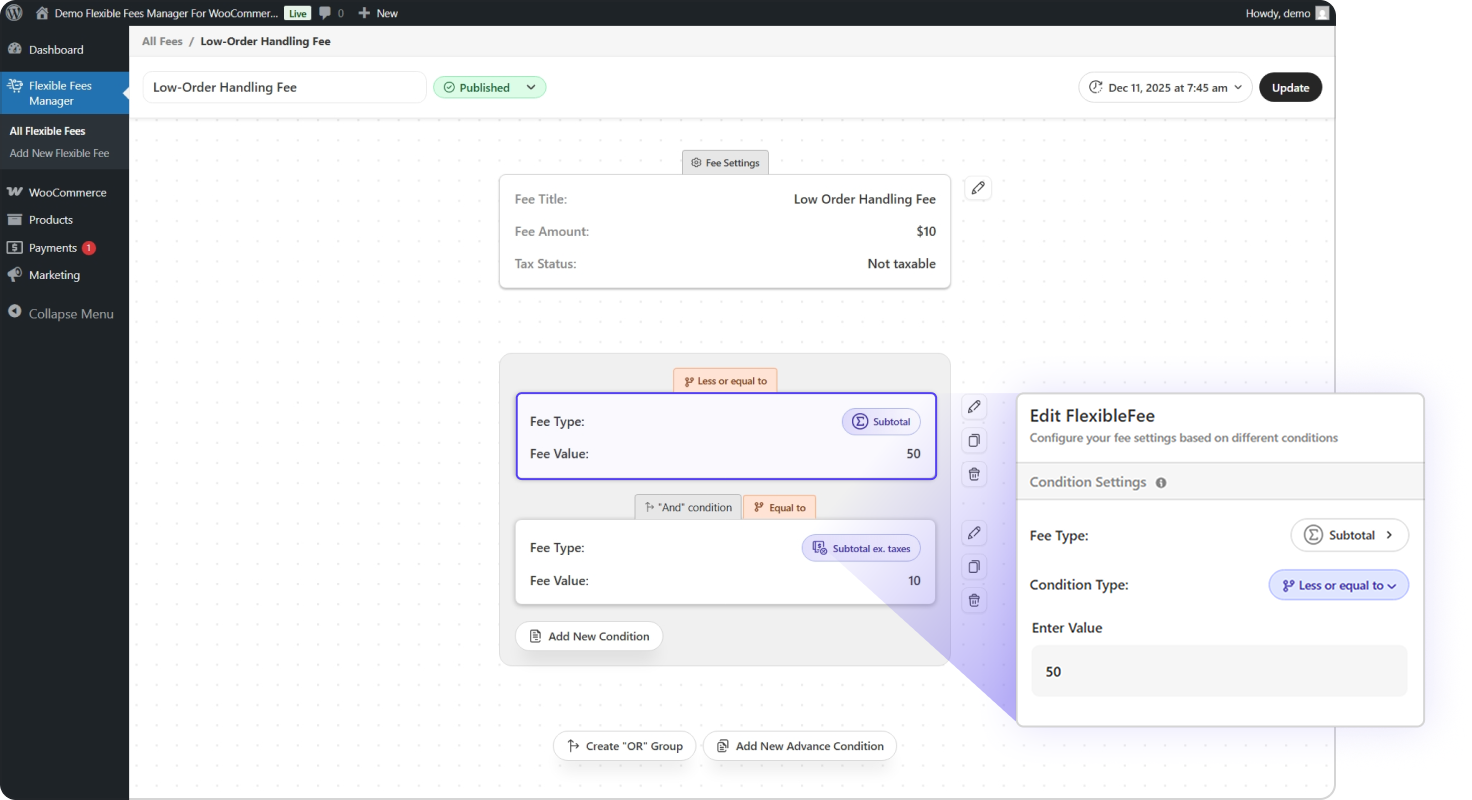
Control every fee with precise, condition-based rules
Flexible Fees Manager for WooCommerce allows you to create highly targeted fee rules using a wide range of conditions. Combine multiple conditions together or use them individually — the system adapts to any pricing logic your store requires.
Choose display options
- Subtotal (with or without tax) - Quantity of items - Total weight - Cart contains a specific product - Cart contains a product - Applied coupon - Cart tax amount Example for WooCommerce conditional cart rules: “Apply a $5 handling fee when cart subtotal (excluding tax) is below $40.”
Target fees based on who the customer is.
- User role - User Zipcode - Customer details (city, state, country) Example for WooCommerce user-based fees: “Offer discounted service fees for wholesale members only..”
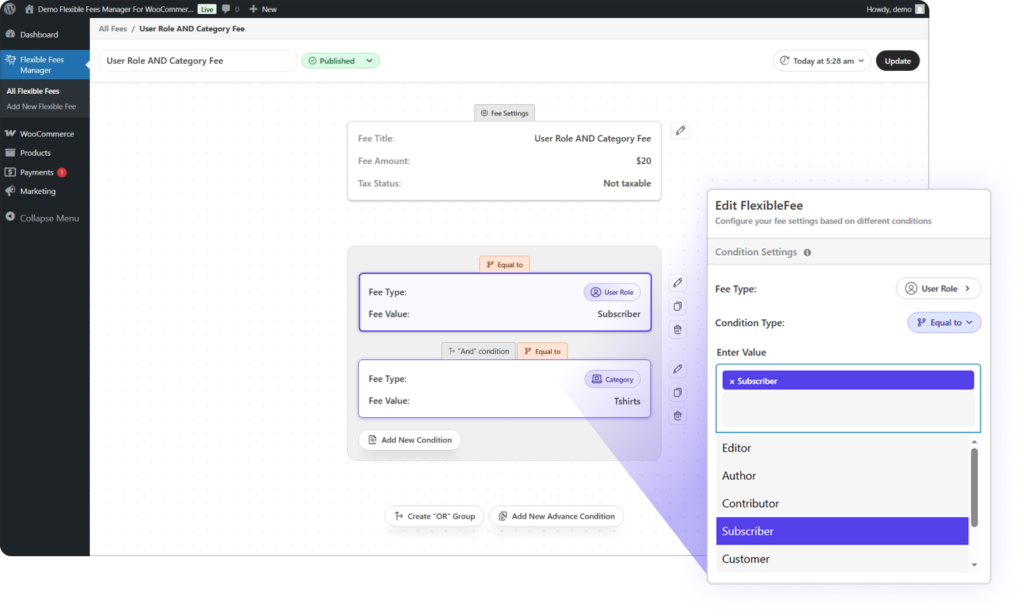
Apply fees using product-specific data.
- Specefic Product Based - Category - Stock quantity - Stock status (in stock, low stock, out of stock) - Weight - Dimensions (length, width, height) Example for WooCommerce product fees: “Add a fragile-item fee for products with weight under 500g."
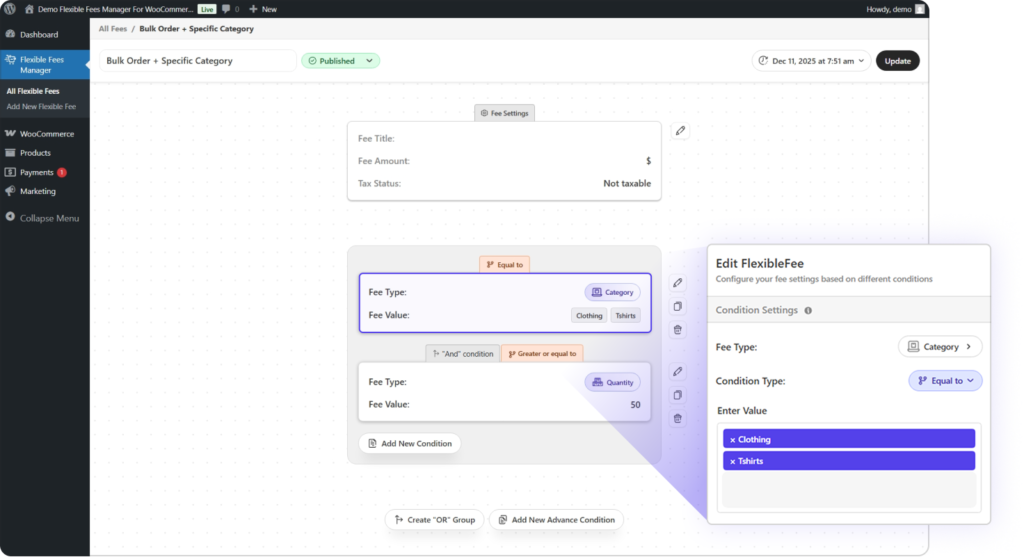
Charge fees based on where the customer is located.
- Country - State or region - City - ZIP code or ZIP code range Example for WooCommerce location-based fees: “Apply an additional delivery fee for remote ZIP codes."
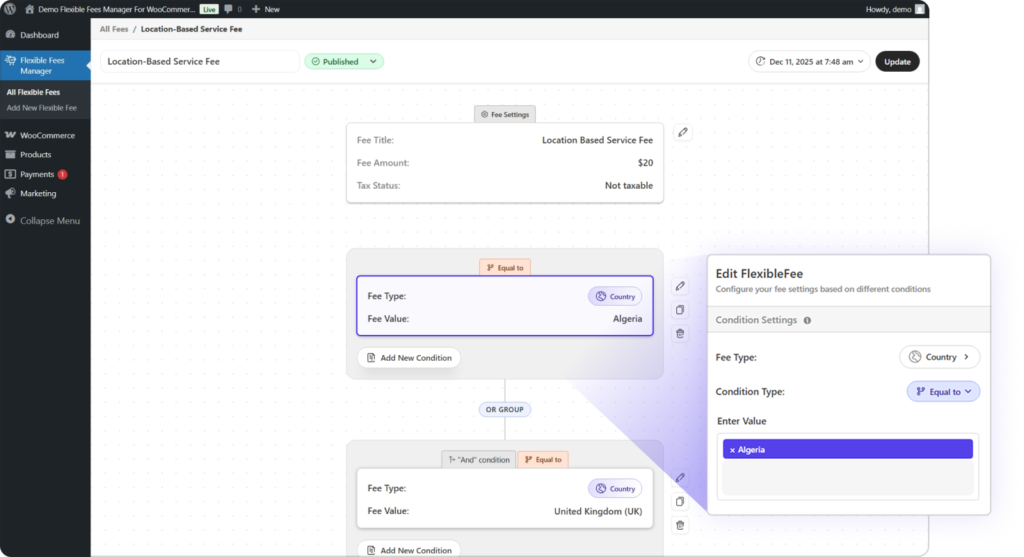
Trigger fees based on shipping and tax preferences.
- Selected shipping method - Shipping class - Taxable or non-taxable cart configuration Example for WooCommerce shipping fees: Add a COD fee only when Cash on Delivery is selected."
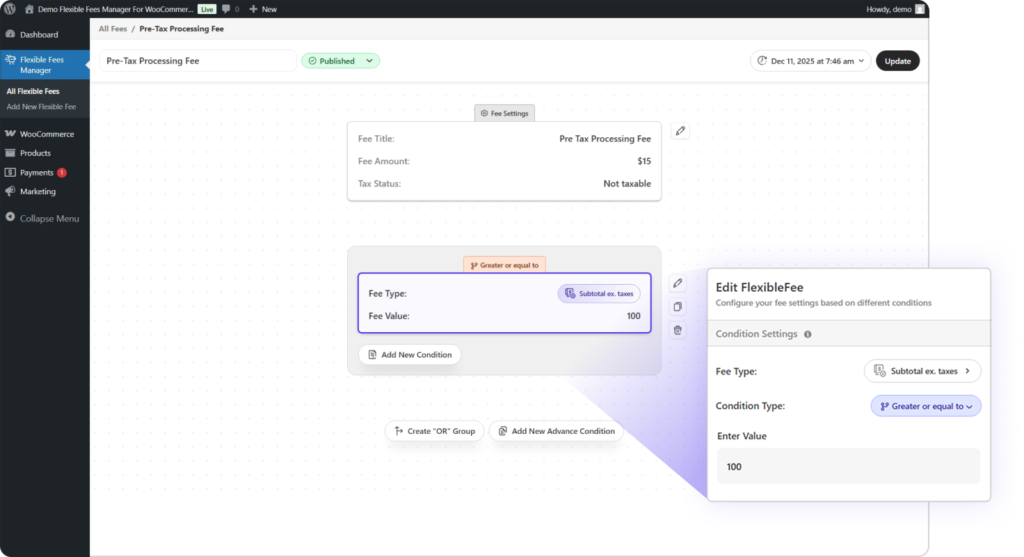
Pricing Plan
Simple pricing. powerful fee control.
Choose a plan that fits your store today — upgrade anytime as you grow.
Most Popular
You save: $40
Unlimited sites · No per-site limits
Annual Plan (Pro)
Best for store owners and agencies who want full Pro features with ongoing updates and support, while keeping costs flexible year to year.
Billed annually · Cancel anytime
What’s Included:
- Full access to Flexible Fees Manager Pro
- Unlimited fee rules
- Visual condition builder (no coding required)
- AND / OR conditional logic
- Cart-based fee conditions
- Product-based fee conditions
- User role–based fee conditions
- Location-based fee conditions
- Shipping & payment method fee rules
- Fee discounts using negative values
- Tax class configuration for fees
- Real-time cart & checkout fee display
- Standard support
- Updates for 1 year
Lifetime Plan (Pro)
Ideal for agencies and serious WooCommerce users who want lifetime access, updates, and support without recurring costs.
No renewals · Pay once, use forever
What’s Included:
- Full access to Flexible Fees Manager Pro
- Unlimited fee rules
- Visual condition builder (no coding required)
- AND / OR conditional logic
- Cart-based fee conditions
- Product-based fee conditions
- User role–based fee conditions
- Location-based fee conditions
- Shipping & payment method fee rules
- Fee discounts using negative values
- Tax class configuration for fees
- Real-time cart & checkout fee display
- Standard support
- Lifetime updates
Why store owners Love ❤ FFMW.
Unmatched flexibility
Choose fee you need from simple add-ons to advanced rule-based pricing without restrictions.
Lightweight & performance-focused
Optimized code ensures your store stays fast and responsive, with zero unnecessary bloat.
Accurate, reliable calculations
Designed to work seamlessly with WooCommerce, ensuring every fee is applied correctly at checkout.

Frequently asked questions
What is Flexible Fees Manager for WooCommerce?
Flexible Fees Manager for WooCommerce is a powerful plugin that allows you to add fixed or percentage-based extra fees using advanced, condition-based rules. You can apply fees based on cart, user, product, location, shipping, and tax conditions without writing any code.
Can I add multiple fees at the same time?
Yes. You can create and run multiple fee rules simultaneously. Each fee can have its own conditions, priority, and calculation logic without conflicts.
Does this plugin support conditional fees in WooCommerce?
Absolutely. Flexible Fees Manager is built specifically for conditional pricing. You can apply fees only when specific conditions are met, such as cart total, selected products, user role, shipping method, or customer location.
Can I apply fees based on cart subtotal or quantity?
Yes. You can apply fees based on cart subtotal (with or without tax), total quantity of items, cart weight, applied coupons, and cart tax amount.
Can I charge fees based on products or categories?
Yes. Fees can be applied based on specific products, product categories, stock quantity, stock status, product weight, or product dimensions.
Does it support user-based or role-based fees?
Yes. You can apply fees based on user roles, logged-in or guest users, and customer details such as country, state, or city.
Can I apply location-based fees?
Yes. You can add fees based on customer location, including country, state, city, and ZIP or postal code ranges.
Can I add a Cash on Delivery (COD) fee?
Yes. You can easily add a COD fee that applies only when Cash on Delivery is selected at checkout.
Are fees visible to customers on cart and checkout pages?
Yes. All fees are clearly displayed on the cart and checkout pages with custom labels, ensuring full transparency for customers.
Can I control how fees are labeled?
Yes. You can customize the fee name so customers clearly understand what the charge is for.
Can I control whether fees are taxable?
Yes. You can choose whether a fee is taxable or non-taxable and assign a tax class if required.
Does the plugin support fixed and percentage-based fees?
Yes. You can create both fixed-amount fees and percentage-based fees depending on your pricing strategy.
Does this plugin affect WooCommerce performance?
No. Flexible Fees Manager is lightweight and optimized to ensure fast cart and checkout performance.
Is coding required to use this plugin?
No. All fee rules are created using an intuitive visual interface with dropdowns and toggles — no coding knowledge needed.
Can I enable or disable fees easily?
Yes. All fees can be enabled, disabled, or edited at any time from the centralized fees dashboard.
Will fees apply in real time?
Yes. Fees are calculated and displayed instantly as customers update their cart or checkout selections.
Is the plugin compatible with the latest WooCommerce version?
Yes. Flexible Fees Manager is fully compatible with the latest versions of WooCommerce.
Will it work with my WooCommerce theme?
Yes. The plugin works with all standard WooCommerce-compatible themes.
Can I test fee rules before going live?
Yes. You can create and test fee rules safely and enable them only when you’re ready.
Does it work with discounts and coupons?
Yes. Fees work alongside WooCommerce coupons and discounts without breaking calculations.
Is there a money-back guarantee?
Yes. The plugin includes a 14-day money-back guarantee, so you can try it risk-free.
Is support available if I need help?
Yes. We provide support to help you with troubleshooting.
You can request a refund within 14 days. No questions asked.
14-Day Money-Back Guarantee
We want you to experience the full power of Flexible Fees Manager for WooCommerce with complete confidence. Install the plugin, explore every feature, create advanced fee rules, and test it thoroughly on your WooCommerce store — completely risk-free.
If the plugin doesn’t meet your expectations or fit your business needs, you’re fully protected with our 14-day money-back guarantee.
Enjoy peace of mind while optimizing your pricing strategy and increasing revenue — without any commitment.
Take full control of your WooCommerce fees.
Customize fees the way your store needs — faster, smarter, and without complexity.